inlynk logo
inlynk contracts management

Every contract, tracked from first draft to final obligation

Contracts stop moving the moment they leave a single owner's inbox. inLynk's CLM module keeps drafting, negotiation, signatures, and renewal obligations on one record — visible to everyone who's supposed to see it, and no one else.

Role-based access, live per workspaceFull audit trail, every action
HOW IT MOVES

The lifecycle, in one place

Watch a single contract move through every stage — the same six states every contract in the module follows.

Contract lifecycle00:00
Master Services Agreement — Veyra Logistics
CTR-2291 · Owner: A. Rao
Network
Draft
Draft
Internal
Review
Approved
Negotiation
Signature
Active

The Network badge only appears here because this contract genuinely comes from a cross-organization partnership — not as decoration.

WHAT USUALLY GOES WRONG

Contracts rarely fail at signing. They fail in the weeks before it.

Most CLM problems aren't visible until a renewal is missed or a redline gets lost in someone's inbox. These are the three places it usually breaks.

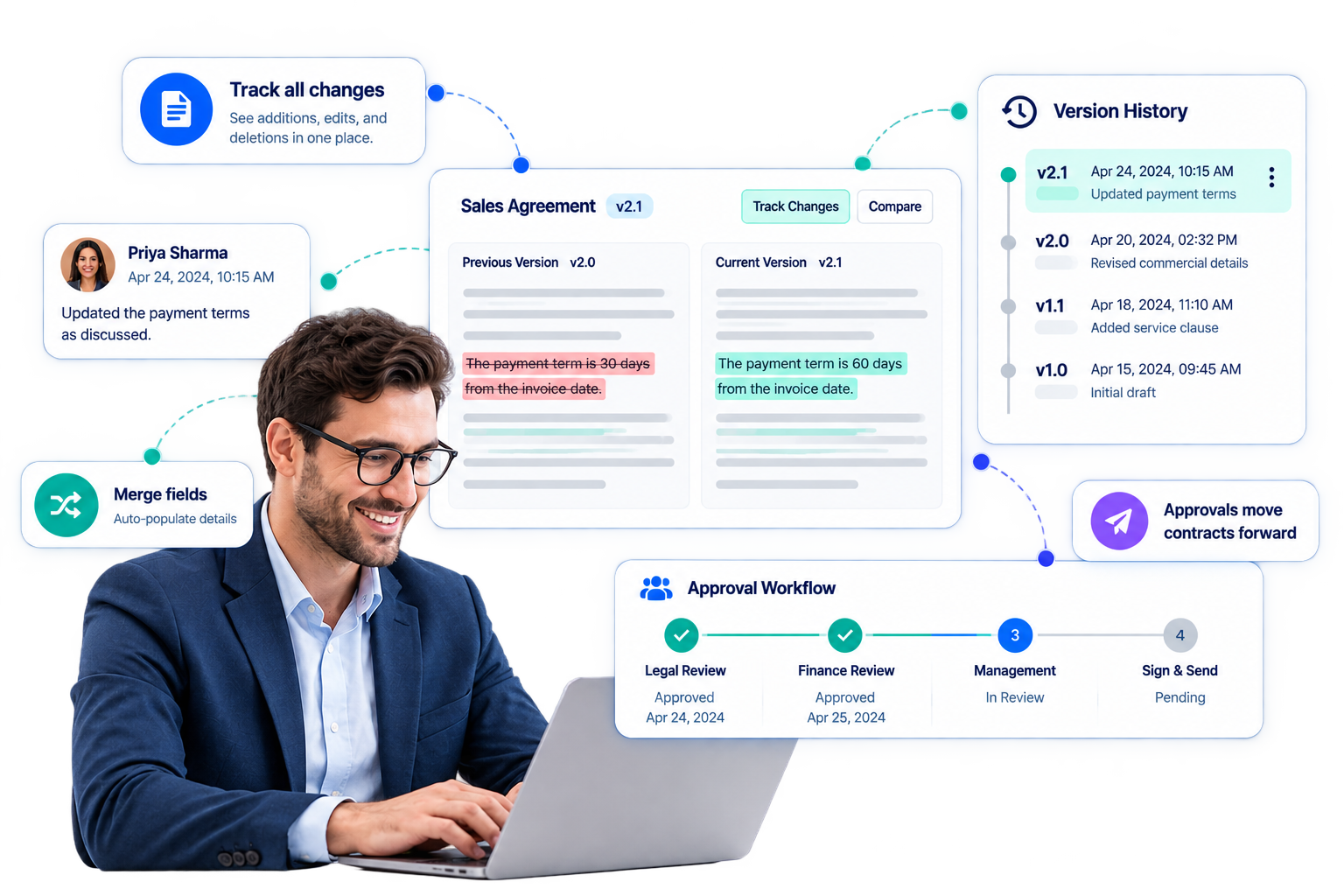
Negotiation tab showing tracked changes, threaded comments, and live status while a contract is out with the counterparty

The real version lives in email

Redlines, comments, and counterparty replies scatter across inboxes instead of staying attached to the contract — so nobody has a single, current version of the truth.
  • Tracked changes you can accept, reject, or apply in one click.
  • Comments stay attached to the exact clause, not scattered in inboxes.
  • See the counterparty's response the moment it comes back.
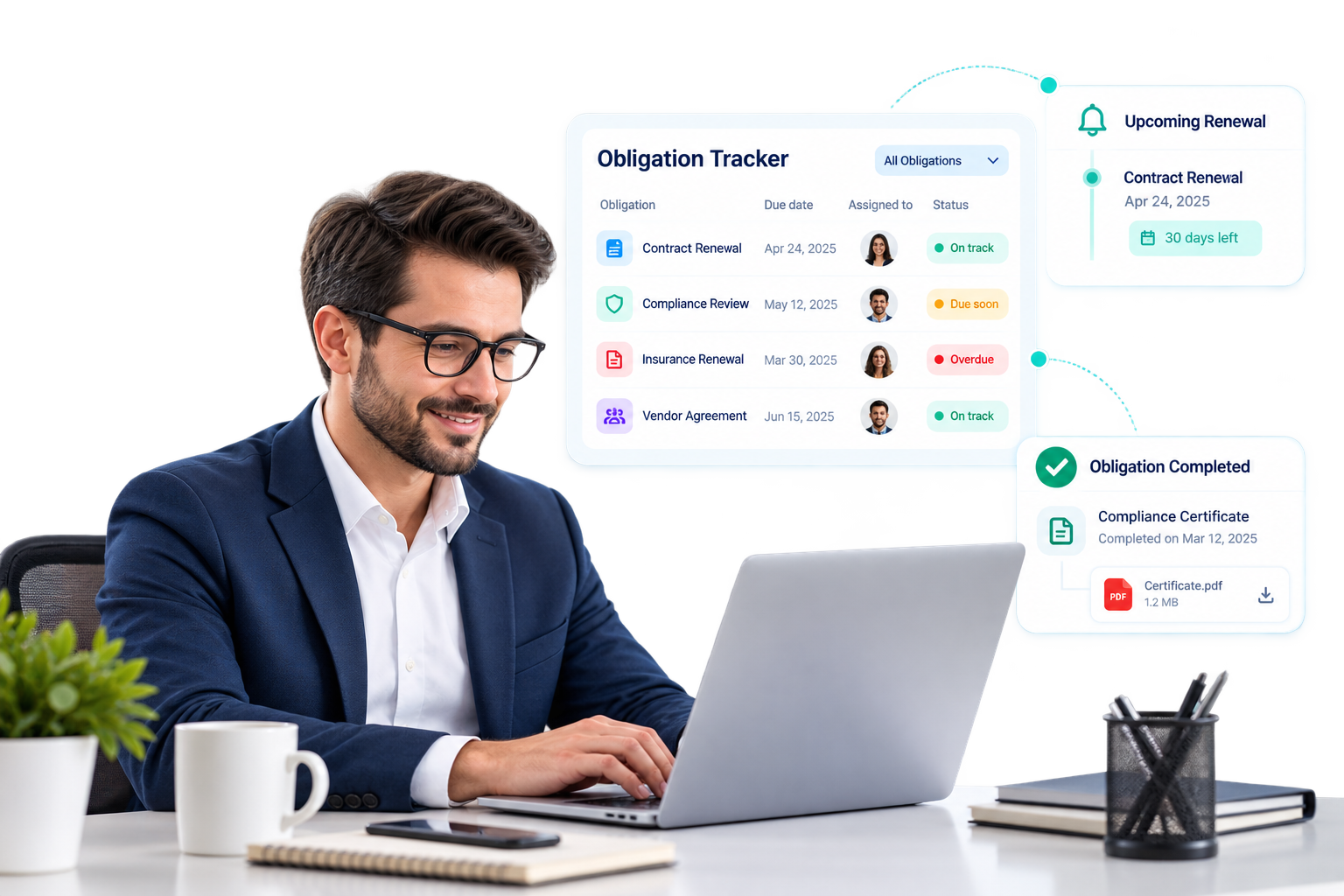
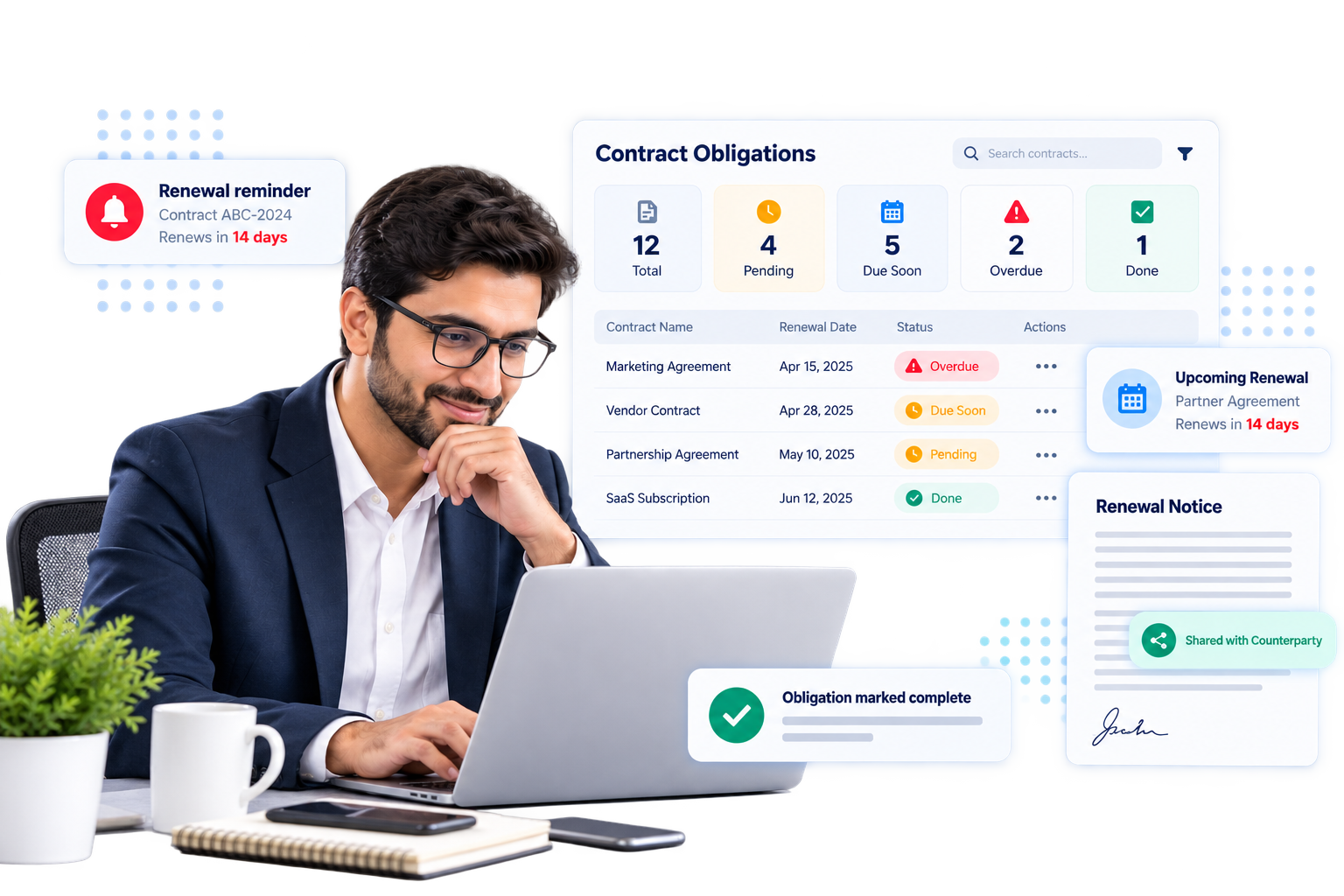
My Obligations dashboard showing pending, due soon, overdue, and completed obligations across all contracts

Renewal windows close quietly

Obligations buried on page twelve of a contract get forgotten until a renewal deadline has already passed or a commitment quietly lapses.
  • Every obligation tracked in one dashboard — Pending, Due Soon, Overdue, Done.
  • Reminders and overdue flags run automatically.
  • Mark done with proof, and share it with the counterparty.
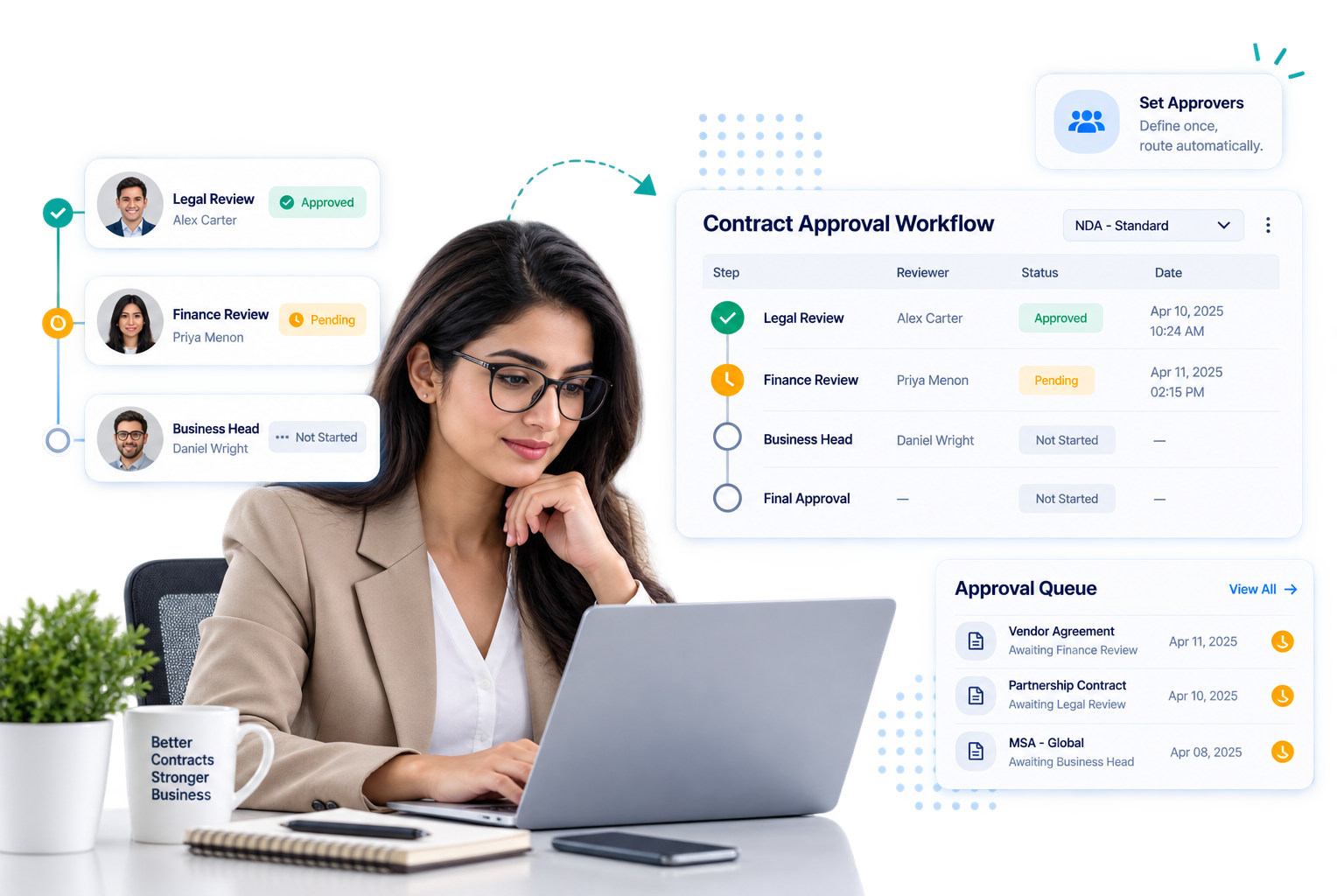
Central Approvals queue showing pending contract, clause, and intake submission approvals

Approvals sit with no clear owner

Contracts stall in limbo when there's no defined routing for who needs to sign off next, leaving deals stuck with no accountable owner.

  • Each contract type follows its own approval chain, in order.
  • Set the approvers once — future contracts route themselves.
  • One queue for all pending contracts, clauses, and submissions.
WHAT'S INSIDE

One module, the whole lifecycle

Five connected pillars — not five separate tools. A contract created from an intake form carries its history straight through to its obligations.

01

Start from a template

Templates, merge fields, and a rich-text editor built for contracts.

Drafts start from a guided form or a partner request, and render from contract-type templates with reusable clauses. Everything auto-saves as you write, with a letterhead preview before sending.

02

See every change

Tracked changes and a real approval queue, not an email chain.

Send a contract for negotiation and see every accepted or rejected change inline, with comments threaded to the exact clause. Multi-step approval chains route sign-off automatically.

03

Turn-based signing

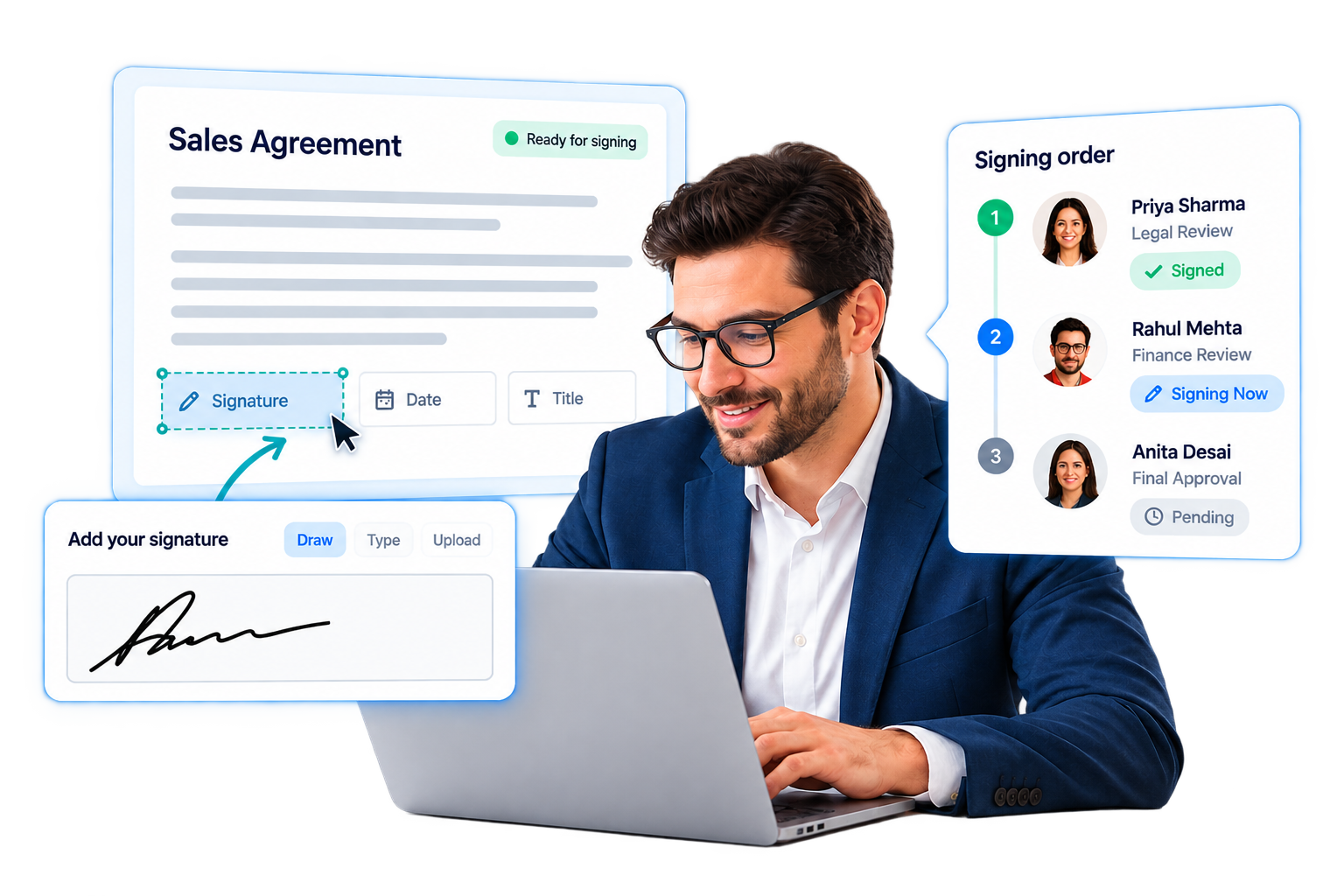
Drag-and-drop field placement and an enforced signing order.

Place signature, date, and title fields directly on the document. Every signature — drawn, typed, or uploaded — is captured with consent on record, complete with an audit certificate.

04

Track obligations

One dashboard for every obligation you own across active contracts.

Recurring obligations and renewal windows surface automatically. Marking one complete can carry proof straight to the counterparty. Overdue items always stay one click away.

05

See the portfolio

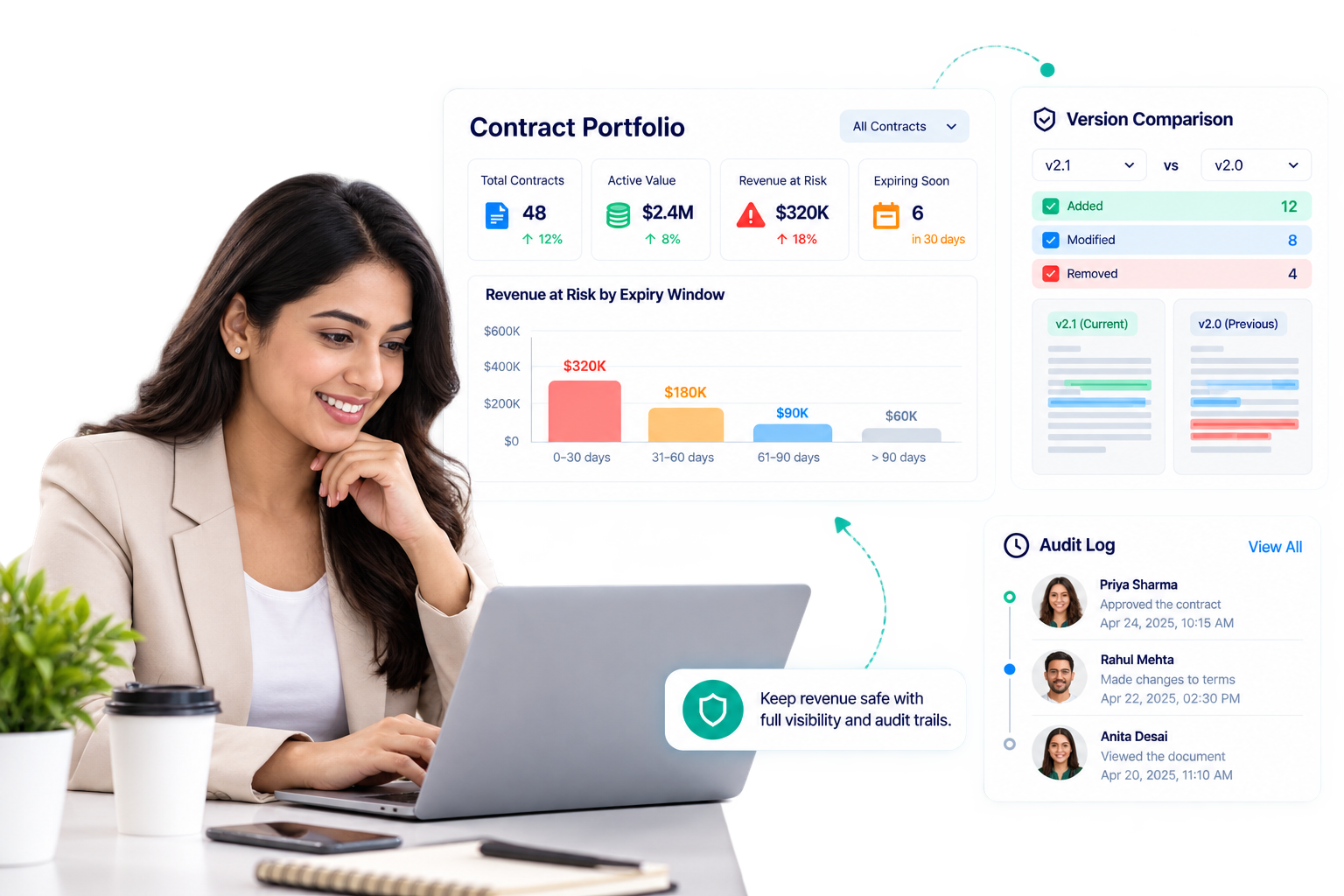
Revenue at risk, approval turnaround, and a full audit log.

See revenue at risk by expiry window across 30, 60, and 90 days. Version history lets you compare any two drafts side by side instead of relying on a folder of PDFs.
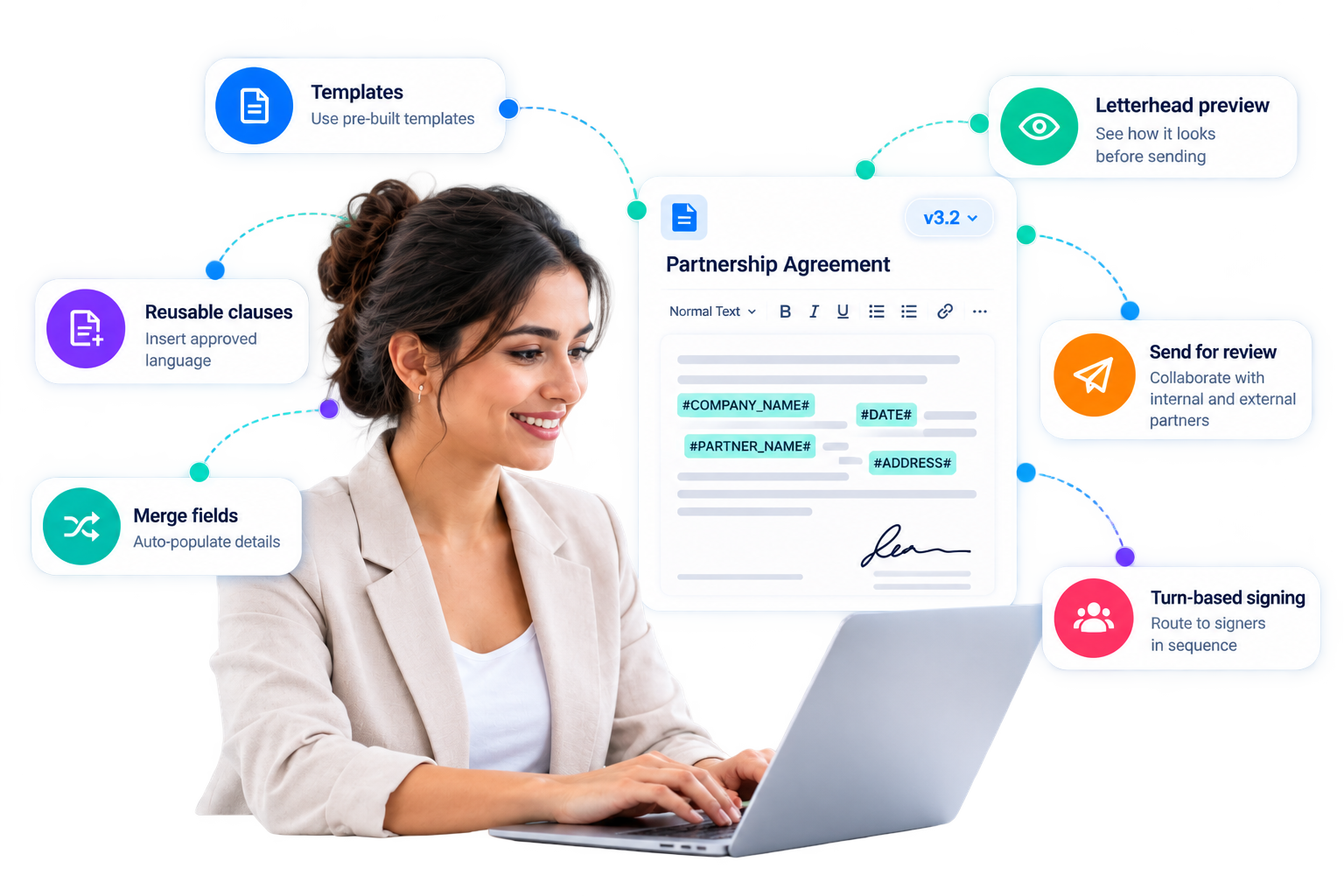
Contract drafting editor with rich-text formatting and merge fields, shown inside the contract detail page document tab
Negotiation tab showing tracked changes and threaded comments attached to specific contract clauses
Signature field placement screen with signer roster and enforced signing order
Obligations dashboard showing pending, due soon, overdue, and completed items across all contracts
Portfolio dashboard with KPI grid, revenue-at-risk view, and contract health score
BUILT FOR PROCUREMENT REVIEW

Access control that matches how your org actually works

Nothing here is bolted on. Permissions, sharing, and audit history are core to every record — not an add-on module.

Workspace-scoped RBAC

Permissions apply per active workspace and update live — no stale access after a role changes.

Read-only when shared

Contracts shared by a partner render from the receiving side, clearly marked, never editable by mistake.

Complete activity log

Every status change, approval, and edit is timestamped and attributable — ready for an internal or external audit.

Signed originals, retrievable

Every signature session produces a certificate you can pull on demand — not just a PDF with a logo on it.


Certifications & compliance
Client LogoClient LogoClient LogoClient LogoClient LogoClient LogoClient LogoClient LogoClient LogoClient LogoClient LogoClient LogoClient LogoClient LogoClient LogoClient Logo

Get In Touch

Have questions about deployment, pricing, or security? Our team is ready to answer all your questions.

Contact Information

WhatsApp Us+91 70323 22665

Fill in your name and email to continue — the rest of the form will appear.

Loading reCAPTCHA...

FAQ

Common questions

A few things teams usually ask before rolling this out to legal, finance, and deal owners.

What actually happens as a contract moves from draft to active?+
Every contract follows the same lifecycle: draft, internal review, approved, negotiation, signature, then active. Depending on the contract type, it can route through an approval chain before negotiation, or skip straight to signature once every merge field is filled in. Renewals, terminations, and holds all branch off this same tracked status, so there's one record of where a contract stands at any point.
How does negotiation and redlining work with the counterparty?+
Once a contract is sent for negotiation, every insertion or deletion shows up as a tracked change that either side can accept or reject — individually or all at once. Comments stay threaded to the exact clause they refer to, and the system polls for updates while the contract is out with the counterparty, so nobody has to keep refreshing an inbox to see what changed.
How are contracts signed, and what proof do we get afterward?+
Signature fields are placed directly on the document, signing order is enforced between your team and the counterparty, and each signer can draw, type, or upload their signature with consent captured at the time. Once everyone has signed, you can pull the final signed PDF along with an audit certificate on demand — not just a static file with a logo on it.
How do we make sure renewals and recurring obligations don't get missed?+
Obligations — one-time or recurring — live on a cross-contract dashboard grouped into pending, due soon, overdue, and done. Renewal windows and recurring items surface automatically instead of depending on someone remembering a clause on page 12, and marking one complete can carry proof of completion straight to the counterparty.
Who can see and edit a shared or cross-organization contract?+
Access is role-based and scoped to your active workspace, and it updates live if someone's role changes — no stale permissions. Contracts shared in from a partner organization render read-only from the receiving side and are clearly marked, so there's no risk of editing a counterparty's version by mistake.

Every feature on this page, walked through on your own contract.

Bring a real agreement and we'll show drafting, negotiation, signing, and obligation tracking on it directly — not a canned demo.